If you are reading these rules for the first time, ignore the text along the right hand side. These rules serve as a summary to help you quickly familiarize yourself with the game.
THE STORY SO FAR
The world has changed. It is the 26th century and New Earth is slowly recovering from the Day of Purgation: the day
a mysterious, catastrophic explosion shook the entire planet. The majority of the population was exterminated, and
most of the surface became uninhabitable. No one understood what really caused the apocalypse — the only thing the
survivors could do was find shelter until the dust settled.
The remnants of humanity organized along four radically different ideologies, called Paths: the peaceful Path of Harmony,
living in one of the few surviving cradles of nature blooming with flora and fauna; the stern Path of Dominance, ever
cruising the oceans aboard their huge metropolis-ship, the Atlantean; the cunning Path of Progress, looking down on
Earth from their city in the sky; and the devout Path of Salvation, dwelling in huge underground halls and chambers.
Followers of the four Paths live in a fragile peace, but in almost complete isolation. Their only meeting point is the
Capital, the last independent city on Earth, led by a global governing body: the World Council.
Many years later, explorers discovered a rich seam of an unknown substance at the desolate Ground Zero of the Day of
Purgation. The durable and light Neutronium, as they named it, proved excellent as building material. To commemorate
the 300th anniversary of the apocalyptic day, the World Council initiated the construction of five Monuments, made
entirely of Neutronium, representing the four Paths and the World Capital. When the celebration started, the delegations
of the four Paths witnessed humanity’s most life-changing event since the Purgation.
Time Rifts from the future opened on the Monuments, revealing the true power of the mysterious Neutronium: when
exposed to energy, it is capable of opening wormholes through time. The connection with the future gifted humanity
with unprecedented growth and prosperity, but also led to a grim realization: the Purgation was the result of the very
first of the Time Rifts. The devastating energy of a future asteroid impact was transferred back in time due to the
massive amount of Neutronium within the asteroid’s matter. This impact is now looming on the horizon, threatening to
devastate not only the past, but also the future.
With the assets of present and future at their disposal, each faction will do everything to prepare for the upcoming
impact – and dominate Humanity’s future as the one true Path.
Discover more about Anachrony’s story and the Paths at www.mindclashgames.com!
GAME OVERVIEW
In Anachrony, you are the Leader of one of New Earth’s ideological Paths: Harmony, Dominance, Progress and Salvation.
Your ultimate goal is to prepare for an upcoming asteroid impact, secure the future of your people, and overcome the
other three Paths as the dominant ideology in shaping humanity’s future.
The game is played through up to seven rounds, called Eras, each symbolizing several years. After the fourth Era, the
asteroid impact occurs, changing how the remaining Eras play out, and triggering the countdown to the game end.
Anachrony is centered around three game concepts: powering up and using Exosuits, taking Actions with Workers,
and using Time Travel. In this section, we give a short
overview of these concepts - details of the gameplay will
be described in the subsequent chapters.
Exosuits: At the beginning of each Era, you will choose how many Exosuits to power up, which will determine how many Actions you can take on the Main board.
Exosuits: At the beginning of each Era, each player may choose to power up up to
6 Exosuits. This potentially costs Energy Cores. The number of Exosuits determines how many
Actions you can take on the Main board (they protect your Workers as they venture out of
the safety of your Path’s Capital).
Actions: In the Action rounds phase, players alternate taking Actions using Workers. You can use a Worker on your Player board, or in an Exosuit on the Main board. Used Workers tend to become tired.
Taking Actions with Workers:
The Action rounds phase is the heart of each Era, when players alternate taking Actions using
their Workers. A Worker may be used individually (on your Player board) or in an Exosuit (on the
Main board). Usually, Workers used to take an Action during the Action Rounds phase become
tired at the end of the Era.
Time Travel: At the beginning of each Era, you can request assets from your future. Later you must send these assets back to the past; the later they are sent back, the more likely you are to gain Paradoxes and Anomalies.
Time Travel: Thanks to the Time Rifts, humanity can now use Time Travel to boost its progress:
at the beginning of each Era, in the Warp phase, they may request resources and manpower from their future –
this is symbolized by the Warp tiles placed on the Timeline. Later, however, these assets
have to be sent back to the past to close the loop – this is done with Power Plant buildings that
power up your Time Rift and open its Focus to a past Era. The later the assets are returned to
the past, the more likely they are to cause temporal Paradoxes, and ultimately Anomalies.
The game ends with a Victory Point scoring after the
collapse of the World Capital due to the asteroid impact.
There are a number of ways to score Victory Points, with
the most important ones being constructing Buildings
and Superprojects, making scientific Breakthroughs, using
Time Travel, achieving a high Morale, and evacuating the
collapsing World Capital.
GAME TURN – ONE ERA OF PLAY
Each Era is comprised of the following phases, in this order:
Preparation phase – Reveal the Superproject above the next Timeline tile, shift the building
stacks, fill up the supply of Workers and Resources available for this Era.
Paradox phase – Players who excessively
strained the Timeline with Warping have to roll for Paradoxes. This phase is skipped in the first Era.
Power up phase – Players may power up Exosuits,
allowing their Workers to perform Actions on the Main board.
Warp phase – Players may place Warp tiles on
the current Timeline tile to bring assets from the future to the present.
Action rounds phase – Players alternate taking
Actions on their Player boards and the Main board until everyone has passed.
Clean up phase – Retrieve Workers and Exosuits from
the Action spaces, check for Impact and game end, and set the players’ Focus marker on the next Era.
Reveal Superproject: Flip the Superproject above the next
Timeline tile face up (i.e., the tile right to the current one).
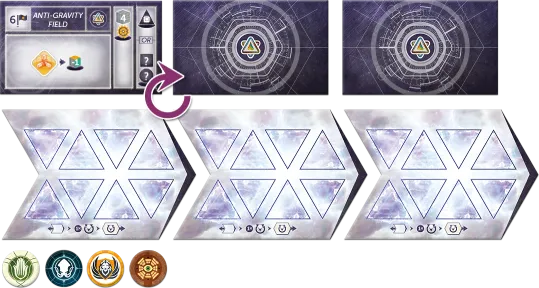
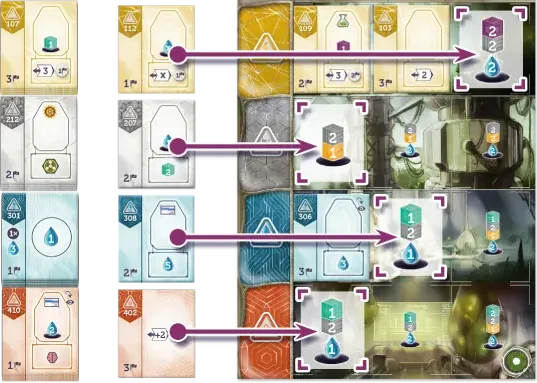
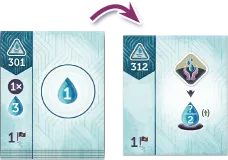 Shift building offers: Place the top building of each primary stack face up next to
it to form a secondary stack (one for each of the four building types). If there are
buildings in the secondary stack already, place the newly shifted one on top of them,
covering the previous top one.
Shift building offers: Place the top building of each primary stack face up next to
it to form a secondary stack (one for each of the four building types). If there are
buildings in the secondary stack already, place the newly shifted one on top of them,
covering the previous top one.
The top buildings of each primary and secondary stack are
available to Construct during the Action Rounds phase.
Determine available Workers: Remove any remaining Workers from the Recruit pool. Draw the top card of the
Recruit pool deck and place the four Workers depicted on the card on the respective Recruit pool slots next to
the Recruit Action. Workers of the same type are stacked upon each other.
Determine available Resources: Remove any remaining Resources from the Mine pool. Draw the top card of the
Mine pool deck and place the five Resources depicted on the card on the Mine pool slots to the left of the Mine
Action. Finally, place a Uranium, a Gold and a Titanium on the respective slot next to each Mine Hex space.
IMPORTANT: After the Impact, ignore the topmost
Resource on the drawn card, and always place a Neutronium on the topmost slot instead.
NOTE: The Paradox phase is only relevant from
the second Era onwards. For reading this rulebook and teaching the game, we suggest skipping this
phase for the first time until you are familiar with the concepts of Warping (Phase 4) and Time Travel.
Paradox rolls
Starting from the left, check every Timeline tile with at least one Warp tile on it. For each tile, the player(s) with
the most Warp tiles on it must roll the Paradox die once, and receive the rolled number of Paradox tokens (0, 1 or
2). If there is a tie for the highest number of Warp tiles on a Timeline tile, all tied players have to roll.
Anomalies
Anomalies are strange and dangerous faults in the fabric of time that cover building spots but do not count as
buildings. Each Anomaly still in place at the end of the game is worth -3 Victory Points.
A player receiving a third Paradox token (by any means) is
immediately affected by an Anomaly. When this happens, they:
Any Anomaly tile remaining on a Player board at the end
of the game is worth -3 Victory Points for that player.
NOTE: If players prefer predictability, they may agree
not to use the Paradox die at all, and simply receive 1 Paradox whenever they would roll it.
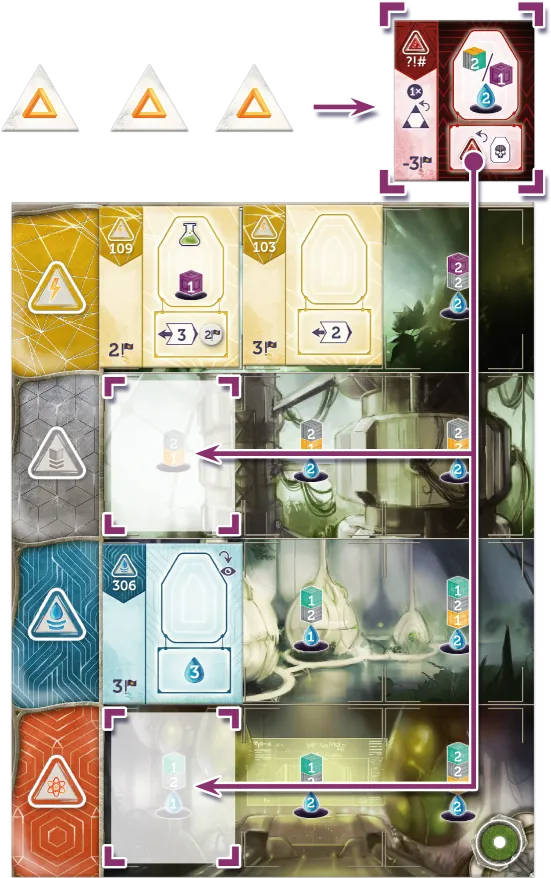
NOTE: If there are no free building spots, the player
must place the Anomaly on top of any of their buildings. That building is not available until the
Anomaly covering it is removed.
NOTE: Certain abilities in the game may raise the limit of Paradoxes above three.
In this phase, players may power up their Path’s Exosuits, which will help their Workers survive the harsh conditions
of New Earth on their way to taking Actions on the Main board.
In a clockwise order starting with the First Player,
each player:
-
Places up to 6 of their Exosuits on the Hex slots of their Player board (one Exosuit per slot), paying
1 Energy Core for each one placed on the three bottom slots.
- Then receives 1 Water for each remaining empty Hex slot.
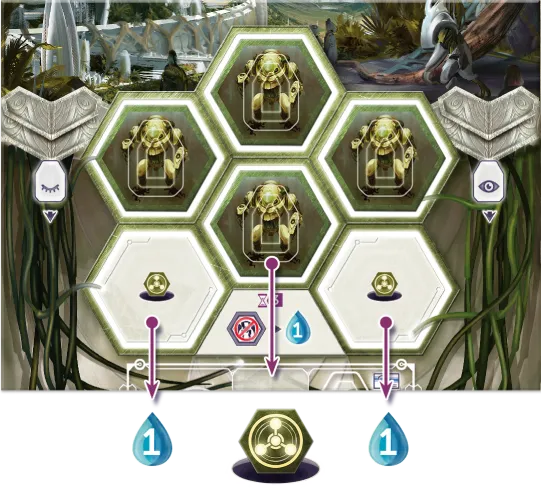
NOTE: To speed up the game, players can agree to
power up their Exosuits simultaneously instead of in turn order.
NOTE: After the
Impact,
two of the top three Hex slots will be covered and unavailable. No Exosuits can be placed there, nor do
they produce any Water income.
Thanks to the Neutronium brought to Earth by the original cataclysm, Time Travel is now possible. Thus, every Era,
players may decide that they will receive something from the future. A decision is all it takes; the desired good
appears immediately. But it doesn’t come for free – a few Eras later it will be the players’ turn to fulfill the claim to
their past selves, and send the goods back, or else risk tearing holes in the time-space continuum.
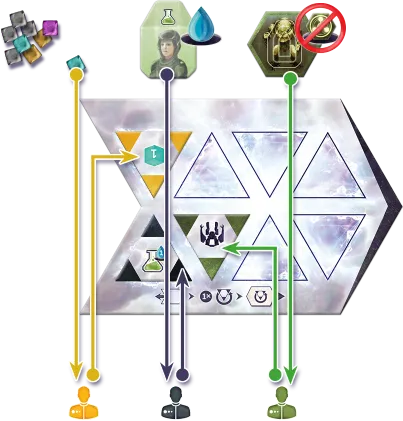
Each player secretly hides 0-2 Warp tiles in their hand (hide the other Warp tiles to maintain secrecy). Reveal
them simultaneously and place them on the present Timeline tile (the order is not important). In player order,
each player immediately receives any asset shown on the selected Warp tile(s). Each tile placed on the Timeline
can be recovered later (see “Power Plant buildings: Time Travel and Focus”) and used again.
- Warped assets are taken from the common supply.
-
Each Worker requires paying 1 Water to be warped in (sending people through the Time Rift seriously
strains them), or else that Warp tile cannot be chosen. However, paying with Water warped in together with
the Worker is possible. Warped Workers are put in the player’s Active column.
- Warped Exosuits are placed on one of the Hex slots of the Player board, even on an Exosuit Hex Unavailable tile.
This is the main phase of the game. Play goes in rounds in clockwise order starting from the First Player. On their
turn, a player may perform any number of Free Actions, then do one of the following:
-
Place one Worker on any empty Worker space on the player’s own Player board (typically on buildings,
Superprojects or Anomalies) and perform its Action.
- Place one Worker with an Exosuit on a Hex space or Hex pool space on the Main board and perform its Action.
- Pass, not placing any more Workers during the Era.
Once all players have passed, proceed to the Clean up phase.
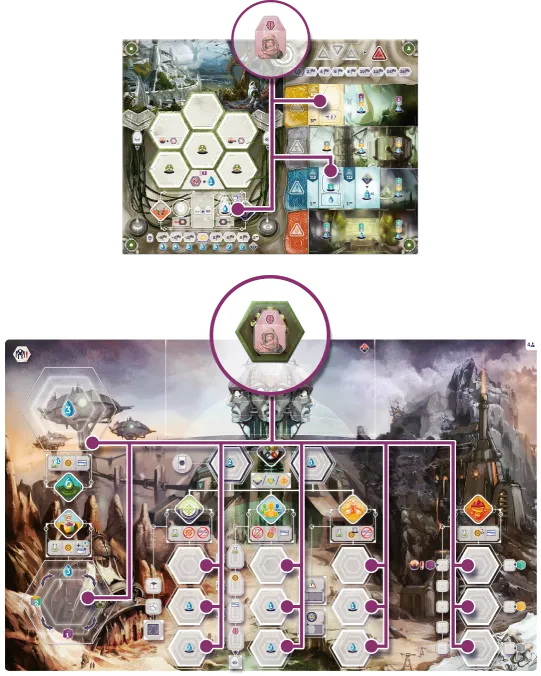
IMPORTANT: Free Actions
Free Actions may each be performed once per Era, during any of the player’s turns. When used,
cover the Free Action spot with a Path marker as a reminder that it has already been performed. Using
a Free Action doesn’t end the player’s turn – they may also place a Worker (or pass) in that same
turn. Path markers are not considered limited – in the unlikely case a player runs out of them, use a
suitable substitute.
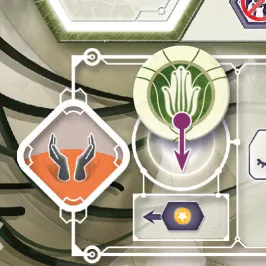 Free Actions typically appear on buildings and Superprojects, but Force Workers and certain
Leader Abilities are Free Actions as well.
Free Actions typically appear on buildings and Superprojects, but Force Workers and certain
Leader Abilities are Free Actions as well.
A) RETRIEVE WORKERS
Retrieve every Worker from every Exosuit on the Main board and all Workers placed on the Player boards’ Worker
spaces. If the Action was marked Motivated  , place the
Worker in its owner’s Active column (to the right of the Supply Action space); otherwise place it in the
Tired column (to the left of the Supply Action space).
, place the
Worker in its owner’s Active column (to the right of the Supply Action space); otherwise place it in the
Tired column (to the left of the Supply Action space).
Retrieve every empty Exosuit from the Main board and place them into each players’ personal supply (NOT on
the Hexes on the Player boards – the Exosuits need to be powered up again).
IMPORTANT: After the Impact, if an Exosuit is
retrieved from a Collapsing Capital Hex space tile, flip the tile to its Hex Unavailable side.
Finally, all players retrieve all Path markers from their Free
Action slots, so they can be used again in the next Era.
B) CHECK FOR IMPACT
The Impact occurs during the Clean up phase of the fourth Era. Proceed to the Impact rules to
resolve it, then continue from here.
C) CHECK FOR GAME END
If any of the below conditions are met, the game ends immediately at this point. Proceed to “Ending the Game”
rules for final scoring (and skip step D).
-
The Capital’s infrastructure has collapsed: All Collapsing Capital Actions have been flipped to their
Hex Unavailable side.
- It is the 7th Era.
D) NEXT ERA
If there are unused Exosuits left on the Player boards’ Hexes at this point, return them to their personal supply. Move each
player’s Focus marker to the Timeline tile corresponding to the next Era (further details at
“Power Plant buildings: Time Travel and Focus”).
Each Era begins with that Timeline tile in Focus for each player. Proceed with
the next Era. The First Player will still be the same as in the previous Era, unless another player took the respective
World Council Action.
ACTIONS
WORKERS AND ACTION SPACES
There are four types of Workers: Scientists, Engineers, Administrators, and Geniuses.
The Genius can act as any of the other Worker types, but it cannot be spent
or counted as another type (such as when repaying Warp tiles or in Evacuation conditions).
A Worker is either Active (in the right column) or Tired (in the left column).
A Worker must be Active to perform an Action or to be repaid for a Warp tile. Other costs that remove Workers
(such as on Superprojects) can accept Active or Tired workers.
There are four different types of Workers in Anachrony: Engineers, Scientists, Administrators and Geniuses.
Workers are placed on Action spaces and take Actions, either on the Main board (with Exosuits) or the players’
own boards. Some of these Worker types excel at certain Actions, while being unable to perform others.
The Genius is a special Worker that may be used as any
Worker type when placed.
IMPORTANT: The Genius may NOT be used instead of other Workers when paying a non-Genius Worker
cost, retrieving Worker Warp tiles via Time Travel, or for Evacuation scoring conditions.
A player’s Worker is considered Active while it is in the Active column on the Player board (as opposed to being
busy on a board, or in the Tired column). Only Active Workers can be used for performing Actions or returned
to retrieve Warp tiles via Time Travel. However, both Active and Tired Workers can be used to pay Worker costs
(typically on Superprojects).
There are three distinct kinds of Action spaces in the game:
- Hex spaces require a Worker in an Exosuit, and are exclusive (limited to one Exosuit).
- Hex Pool spaces require a Worker in an Exosuit, but allow any number of Exosuits.
- Worker spaces are only on Player boards, do not require Exosuits, and are also exclusive.
-
Hex spaces: On the Main board, Action spaces are Hex-shaped since Workers
must be placed on them in a powered-up Exosuit. A Hex space on the Main board becomes unavailable for the rest
of the Era once a Worker has been placed there. Different Hex spaces associated
with the same Action do not have to be occupied in any specific order.
-
Hex Pool spaces: Hex Pool spaces work similarly to Hex spaces, with
the exception that they are always available and any number of Workers may be placed on them (in an Exosuit).
-
Worker spaces: On the Player boards (including buildings, Superprojects and Anomalies), Worker
spaces may only be used once per Era. Workers do not need Exosuits to be sent to these spaces.
Action spaces may have restrictions on Worker types that can be placed there,
benefits for certain Worker types, a cost to place a Worker there,
and/or may keep Workers Motivated after retrieval.
As additional features associated with Action spaces, some of them:
- Have Worker restrictions – Only Workers of the pictured types (or Geniuses) may be placed on them.
- Give additional benefits if a specific type of Worker (or a Genius) is placed on them.
- Have an associated (Water or Resource) cost – These assets must be spent in order to place a Worker on them.
- Keep Workers “Motivated” – Workers on these spaces are placed in the Active column during the Retrieve Workers phase.
The detailed rules and Worker restrictions of each Action are described in the subsequent chapters.
MAIN BOARD ACTIONS
Construct, Recruit, and Research are Capital Actions. The Action spaces on the board cost 0, 1, and 2 Water
respectively (the 3rd space is only in 4-player games), until after Impact when they are covered by Collapsing Capital tiles.
Capital Actions: Construct, Recruit and Research are Capital Actions. After the Impact, Capital Action spaces
are covered by Collapsing Capital tiles providing improved space-related features, whereas the usual Worker-related
restrictions and benefits still apply (see “Impact” for details). Only Capital Actions can be copied with
the World Council Action.
Capital Actions each have 3 available Hex spaces:
- Upper space – no modifiers.
- Middle space – must pay 1 Water.
- Lower space – must pay 2 Water (available in 4-player games only).
CONSTRUCT
You may construct either the top building of any stack, or the Superproject currently in focus
for you (if there still is one). A building must go in its specific row, while a Superproject can go in any row but takes up two
adjacent spots. If you are out of spaces in a row, you cannot build any more buildings of that type.
The cost of a building is on the space where you will place it. The cost of a Superproject is on the Superproject.
The Worker cost of a Superproject can be paid with an Active or Tired Worker.
If a building is taken, the next building in its stack will become available, if there are any. The secondary stack does not refill
from the primary stack, so it may become empty.
Restrictions: No Administrators. Bonuses: Engineers get a discount of 1 Titanium.
Choose one of the following two options:
-
Select a face-up building from the top of any of the 8 building stacks (primary and secondary stacks of
each building type), then place the building on the leftmost empty spot of its respective row of your
Player board, paying the costs indicated on the spot.
- If there are no empty spots for a building type, you may not build any more buildings of that type.
- If a building was selected from the primary stack, the building underneath becomes immediately available.
-
If a building was selected from the secondary stack, if there is a building underneath it, it
becomes immediately available (again).
-
Build the Superproject in Focus (i.e. the one above the Timeline tile where your Focus marker is). By default,
this is the current Era’s Timeline, but Focus can be changed via Time Travel. Place the Superproject on
the two leftmost horizontally adjacent free spots of your Player board (you may choose which row
to place it on if several rows are tied).
Ignore the costs printed on the spots, and instead pay the
costs indicated on the Superproject itself
(including Breakthroughs). If a Superproject has a Worker in its
construction cost, the Worker can be paid from either the Active or Tired columns.
Worker specifics
- May not be activated by an Administrator.
- If activated by an Engineer, subtract 1 Titanium from the total cost of the Action.

RECRUIT
Choose one of the available Workers and add it to your Active column. You get a bonus based on which type of Worker you recruit.
Restrictions: No Scientists. Engineers cannot recruit Geniuses.
Select a Worker from the Recruit pool and add it to the Active column of your
Player board. You also receive a bonus based on the type of the Worker chosen:
- Scientist: 2 Water.
- Engineer: 1 Energy Core.
- Administrator: 1 Victory Point.
- Genius: Any one of the above three bonuses.
Worker specifics
- May not be activated by a Scientist.
-
If activated by an Engineer, you may not select a Genius (only a
Scientist, an Engineer or an Administrator).

RESEARCH
Set one die to a shape or icon of your choice (but not "?"), then roll the other.
Take a Breakthrough tile matching the shape and icon shown by the dice. If you rolled a "?", you can pick any icon.
Restrictions: Scientists only.
Set one Research die (shape or icon) to the face of your choice, and roll the other. Take a Breakthrough tile with
the shape and icon shown by the dice. The “?” on the icon die stands for any icon of your choice.
You may not set the icon die to its “?” face.
NOTE: In the unlikely case the rolled Breakthrough is
not available, reroll one die of your choice.
Worker specifics
- May only be activated by a Scientist.

WORLD COUNCIL
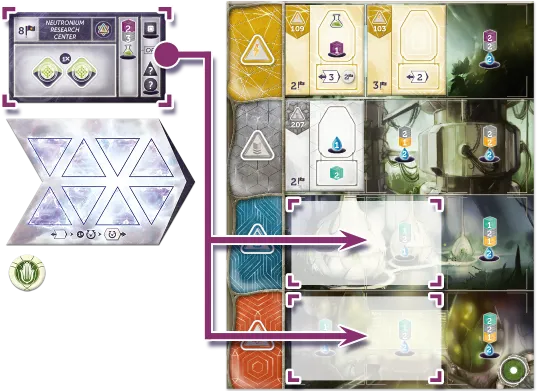
You may perform a Capital Action that has no available spaces (whether occupied or collapsed).
All Worker restrictions and benefits of that Action apply.
Left space: You become First Player. You can do this even if you cannot take the granted Capital Action.
You may choose a Capital Action (Construct, Recruit, Research) with no more available spaces and perform it.
Worker restrictions and benefits of the copied Capital Action apply for the Worker placed on the World Council,
but space-related features (e.g. Water costs on Hexes and Collapsing Capital tile bonuses) do not.
NOTE: In order to become First Player, you may
place a Worker on the left World Council space even if there are still available Worker spaces in all Capital
Actions. In this case, you become the First Player, but otherwise do not get to perform an Action.
Worker specifics
-
Worker restrictions and/or bonuses of this Action are
the same as those of the copied Capital Action.
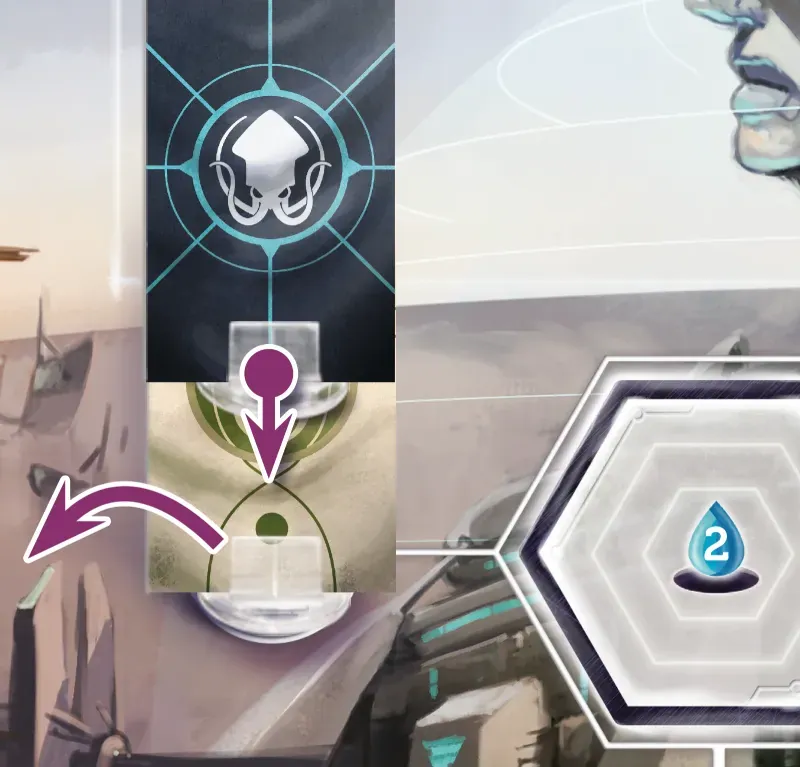
World Council has 2 available Hex spaces:
-
Left space – must pay 2 Water and become the First Player (replace the
previous First Player’s banner on the spot next to this Action space).
- Right space – must pay 1 Water.
IMPORTANT: After the Impact, Capital Actions can
still be copied through the World Council as usual. At that point a Capital Action may be copied even if
each of its spaces are either occupied by an Exosuit or covered by a Hex Unavailable tile.

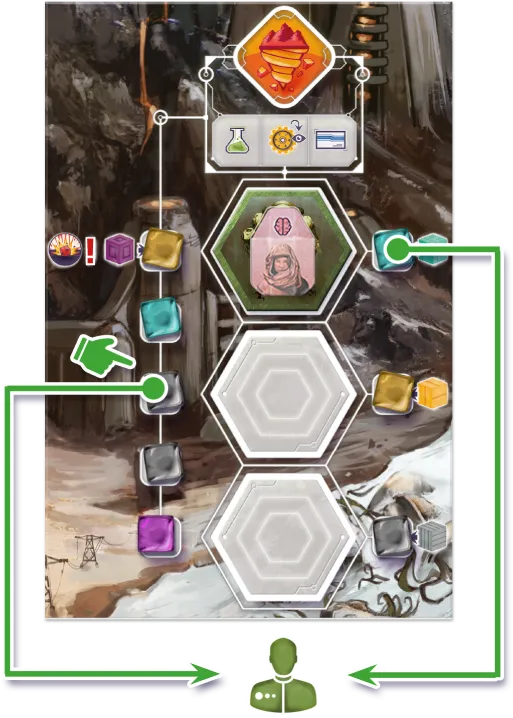
MINE RESOURCE
Take one resource of your choice from the left column, and the specific resource for your chosen space (on the right).
Bonuses: Engineers stay Motivated.
Take 1 Resource of your choice from the Mine pool.
Worker specifics
- If activated by an Engineer, he is kept Motivated.
Mine Resource has 3 available Hex spaces:
- Upper space – take a Uranium in addition to the Resource taken from the Mine pool.
- Middle space – take a Gold in addition to the Resource taken from the Mine pool.
- Lower space – take a Titanium in addition to the Resource taken from the Mine pool.

PURIFY WATER
Gain 3 Water.
Hex Pool: Any number of Workers can be placed here.
Bonuses: Scientists get +1 Water.
Take 3 Water from the supply.
Worker specifics
- If activated by a Scientist, take 1 additional Water.
Purify Water has a Hex Pool space, where any number of Workers can be placed.

TRADE WITH NOMADS
You may exchange resources once as depicted.
Hex Pool: Any number of Workers can be placed here.
Bonuses: Administrators may make a second exchange.
You may choose one of the following:
- Exchange 3 Water to 1 Energy Core; or vice versa.
- Exchange 1 Energy Core to 1 Neutronium; or vice versa.
- Exchange 1 Neutronium to any 2 of Titanium, Uranium, or Gold; or vice versa.
- Exchange any 2 of Titanium, Uranium, or Gold to 3 Water; or vice versa.
Worker specifics
- If activated by an Administrator, you may choose from the above options twice (one after the other).
Trade with Nomads has a Hex Pool space, where any number of Workers can be placed.

EVACUATION
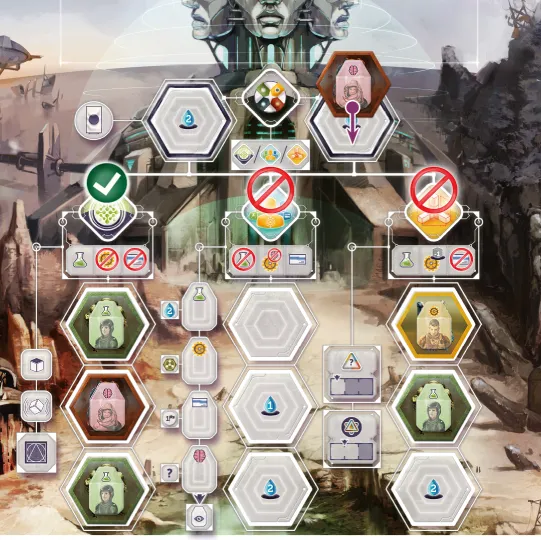
This Action can only be taken once by each player in the game, once they have met the base condition for it
on their Path board. It is not revealed until the Impact.
Place a Path marker in the next slot in the order. You immediately receive the Victory Points on your Path board for meeting the
Evacuation condition, plus bonus Victory Points as depicted on your Path board for every set of the indicated asset(s)
you currently have, minus 3 Victory Points if you placed your marker on the -3 VP marker. If this total is more
than 30 VP, you receive 30 VP instead; if it's less than 0, you receive 0 instead.
Hex Pool: Any number of Workers can be placed here (but still at most one per player).
No Worker restrictions or bonuses.
This Action space will only be available after the Impact. It may only be taken by each player once per game, and
only if they meet the condition stated on their Path board.
Place one of your Path markers on the uppermost free numbered slot on the tile and receive the Victory Points
specified on your Path board under the Evacuation condition. If you placed your Path marker on the spot with
the -3 Victory Points marker, you receive 3 less Victory Points for your Evacuation (to a minimum of 0).
The maximum number of Victory Points that can be received for the Evacuation Action is 30.
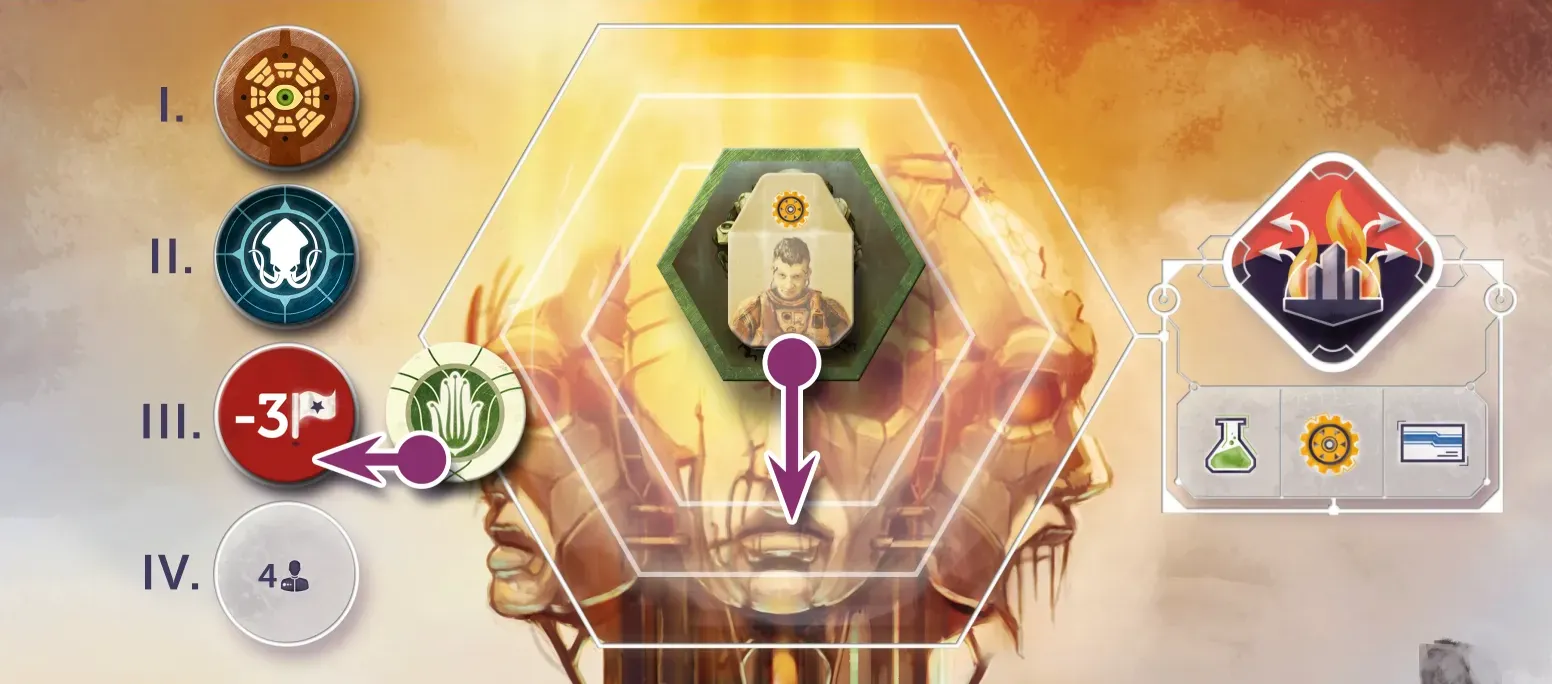
The Path board also addresses specific assets and a related Victory Point ratio. You receive additional Victory
Points based on the amount of that asset you hold when you take the Evacuation Action. After scoring, you keep
these assets.
Worker specifics
- The Evacuation Action can be taken by any Worker.
Evacuation has a Hex Pool space, where any number of Workers can be placed, but each player may only take
this Action once per game.
PLAYER BOARD ACTIONS
All spaces on the Player boards are either Worker spaces or Free Actions — Exosuits are not needed to activate them.

SUPPLY
This Action costs the amount of Water printed below your current step on your Morale track.
Move all your Tired Workers into the Active column. Gain 1 Morale. If you are already at maximum Morale,
instead you gain the immediate reward shown at the end of the track.
Bonuses: Administrators stay Motivated.
The Supply Action is printed on every Player board between the Active and Tired columns. Spend Water equal to the
number printed on the Water symbol below your current position on the Morale track (1), then
move all of your Workers from the Tired column to the Active column (2)
(ready to be used in later Action rounds of the same Era).
Finally, advance one step on the Morale track (3) (to the right).
If you are already at maximum Morale, you receive a
number of VPs indicated at the right end of the Morale track instead of advancing on it.
Worker specifics
- If activated by an Administrator, he is kept Motivated.

FORCE WORKERS
This is a Free Action that costs no Water.
Move all your Tired Workers into the Active column. Lose 1 Morale. If you are already at minimum Morale,
instead you immediately lose a Worker of your choice.
The Force Workers Action is printed on every Player board between the Active and Tired columns.
Force Workers is a Free Action, and requires no Worker.
Place one of your Path markers on the slot (1), the
move all of your Workers from the Tired column to the Active column (2)
(ready to be used in later Action rounds of the same Era). Finally, you
fall back one step on the Morale track (3) (to the left).
If you are already at minimum Morale, you lose a Worker of your choice instead of falling back on the Morale track.
POWER PLANT BUILDINGS: TIME TRAVEL AND FOCUS
Power Plants have a range measured in Eras backward in time from the current Era, ignoring the Impact tile.
When you activate one:
-
Place your Focus marker on any past Timeline tile within the Power Plant's range. (This doesn't have to move
the marker if it's already on a past tile, but it cannot be left on the current Era's tile.)
-
You may choose one of your Warp tiles on the Timeline tile now in Focus and spend the relevant asset:
a resource from your supply, 2 Water, a Worker in your Active column, or a powered-up Exosuit. If you do,
remove the Warp tile and advance your Time Travel marker 1 step.
There are other ways to remove your Warp tiles from Timeline tiles but they do not advance your Time Travel marker.
Constructing a Superproject from a past Era requires that your Focus be set to that Era.
Power Plant buildings allow manipulation of time by powering up the Time Rift. Players can activate them to
turn the Focus of the Time Rift to an earlier Timeline tile. Each Power Plant has a strength and complexity rating
expressed in game terms as its range. When you activate your Power Plant, you may execute the following steps,
in this order:
-
Move your Focus marker onto any past Timeline tile
no further to the left than the Power Plant’s range.
(Measured from the current Era’s Timeline tile, ignoring the Impact tile. Ranges are not cumulative.)
You may also choose to leave your Focus marker on the same past Timeline as long as it is in range of the
Power Plant used. You may never end up with your Focus marker in the current Era after using a Power Plant.
-
You may optionally send an asset back through the Time Rift. Select one
of your own Warp tiles present on the Timeline where the Focus was set to, and spend the Resource/Water/Worker/Exosuit
on that Warp tile. Finally, remove the Warp tile corresponding to the spent asset from the Focused
Timeline tile and return it to your personal supply.
NOTE: This represents the assets being sent back
in time, and “technically” these goods being spent are the very same goods you received in the past,
seemingly “for free”.
IMPORTANT: Workers must be spent from the Active
column and an Exosuit must be sent back poweredup (from one of the Hexes on the Player board).
-
If you executed both steps 1 and 2, move your Time Travel marker on your Player board one step to the right.
Each step on the Time Travel track will be worth Victory Points at the end of the game, representing
the advances the Path has made in using Time Travel technology.
IMPORTANT: If a Warp tile is removed through any
other way (by using a building’s retrieve ability or
when placing an Anomaly), the Time Travel marker
is not moved.
NOTE: Superprojects of earlier Eras can be built by
using the
Construct Action as long as they are in Focus.
ANOMALIES
Each Anomaly on your board provides its own Worker Action. When you place a Worker on it and spend 2 Water plus either
1 Neutronium or any 2 Titanium/Gold/Uranium, remove the Anomaly and Worker from your board and return them to the
general supplies.
This may leave gaps in your building spaces, where you will be able to build as usual.
The Worker performing this Action is lost.
A building spot can occasionally be covered by an Anomaly (see “Paradox phase”).
As an Action, a player may place
a Worker on an Anomaly and spend either 2 Titanium/Uranium/Gold plus 2 Water or 1 Neutronium plus 2 Water
to seal it. Remove the Anomaly and the Worker immediately and place them back in their respective general supplies.
It is possible that gaps might appear on the Player board because of removing an Anomaly - new buildings or even
Superprojects can be constructed there later.
Worker specifics
- The Worker placed on (and thus removing) the Anomaly is immediately returned to the general supply.
OTHER BUILDINGS AND SUPERPROJECTS
Buildings and Superprojects may provide additional Worker Actions or Free Actions.
Some will provide passive abilities. Some have one-time abilities that you
perform immediately upon building it.
See the Appendix for details on specific buildings and Superprojects.
Once a building or Superproject is placed on a Player board, it is available for use to its owner. The abilities and
benefits they provide fall into one of four categories:
-
Worker Actions behave just like any other Player board Worker space. Some Action spaces may have Worker
restrictions or benefits, or costs associated with taking them. Some may keep the Worker Motivated.
-
Free Actions may each be performed once per Era during any of the player’s turns in the Action Rounds
phase, up to and including the turn the player passes. When used, cover them with Path markers to
remember they have already been performed.
-
Passive abilities provide a benefit that remains in effect throughout the game and/or influences the
final scoring.
- One-time abilities are performed once, when the building or Superproject is built.
Details of specific buildings and Superprojects can be found in the Appendix.

IMPACT
At the end of the 4th Era, the asteroid impact hits a desolate part of the Earth,
initiating a cataclysm that will eventually destroy the Capital. Players only have a
few turns to do what they have to and attempt to evacuate parts of the city,
securing further influence in deciding humanity’s future.
EVACUATION
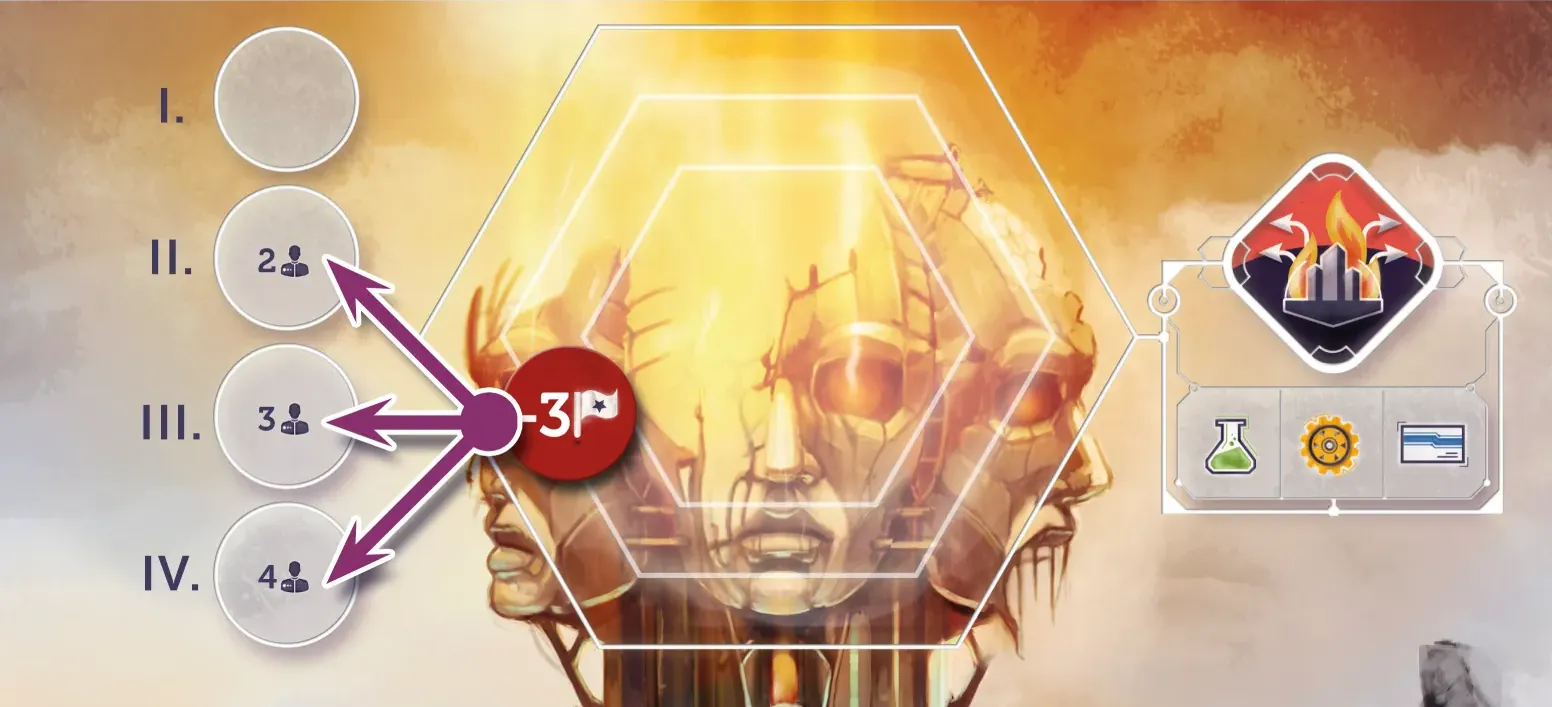
Reveal the Evacuation Action and place the -3 VP marker on the spot corresponding to the number of players.
Turn the Evacuation Action tile to its “B” (damaged) side, revealing the Evacuation Action. In a 2/3/4 player game,
place the “-3 Victory Points” marker on the second/third/fourth spot from the top.
COLLAPSING CAPITAL TILES
Randomly draw 2 (3 for 4 players) of each Capital Action's specific Collapsing Capital tiles
and place them face-up on top of the Action's Hexes. These tiles provide optional bonuses (and no Water costs) when taking
the Action, but they each can only be used once.
When an Exosuit is retrieved from a Collapsing Capital tile, flip that tile to its unavailable side. Once all
Collapsing Capital tiles are flipped, the game will end after the current Era.
You can still use the World Council spots to take a Capital action if its spaces are all collapsed.
After the Impact, the Capital’s structures begin to fail. Because of this, the number of Capital Actions (Construct,
Recruit, Research) players can take for the remainder of the game will be strictly limited.
Separate the Collapsing Capital tiles by their Action into three piles. Select 2/2/3 Hexes randomly from each pile
(for 2/3/4 players) and place them on the Capital Actions’ Hexes, with their available side face up.
The Collapsing Capital tiles provide stronger, “last ditch” versions of the Capital Actions (Worker restrictions still
apply). In addition to taking the Capital Action, the player also receives the bonus depicted on the tile. A detailed list
of these bonuses can be found in the Appendix.
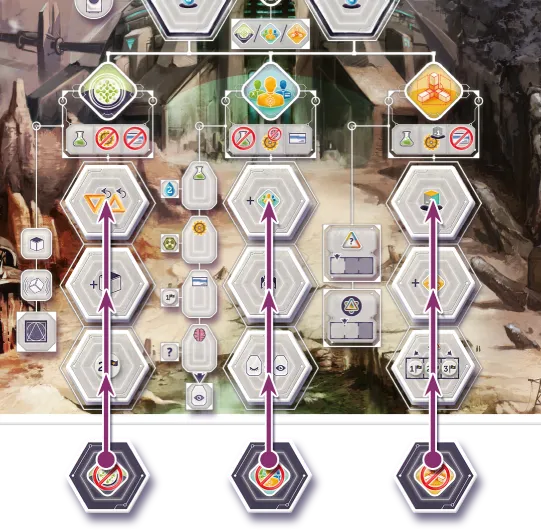
In the Retrieve Workers step of the Clean up phase, flip each Collapsing Capital tile to its unavailable side if an
Exosuit was retrieved from it.
REMINDER: Once the last Collapsing Capital tile is flipped this way, the game will end at the end of the
current Era.
IMPORTANT: The World Council spots can still be used to take Capital Actions (ignoring any Collapsing
Capital tile bonuses) once the respective Capital Action has no free Hex spots left.
HEX UNAVAILABLE TILES
Each player covers the marked Exosuit Hexes on their Player board with Hex Unavailable tiles. You can no longer
power up Exosuits on those tiles, and they do not count for Water income.
While the Paths’ capitals are more or less prepared for the Impact, some damage is inevitable.
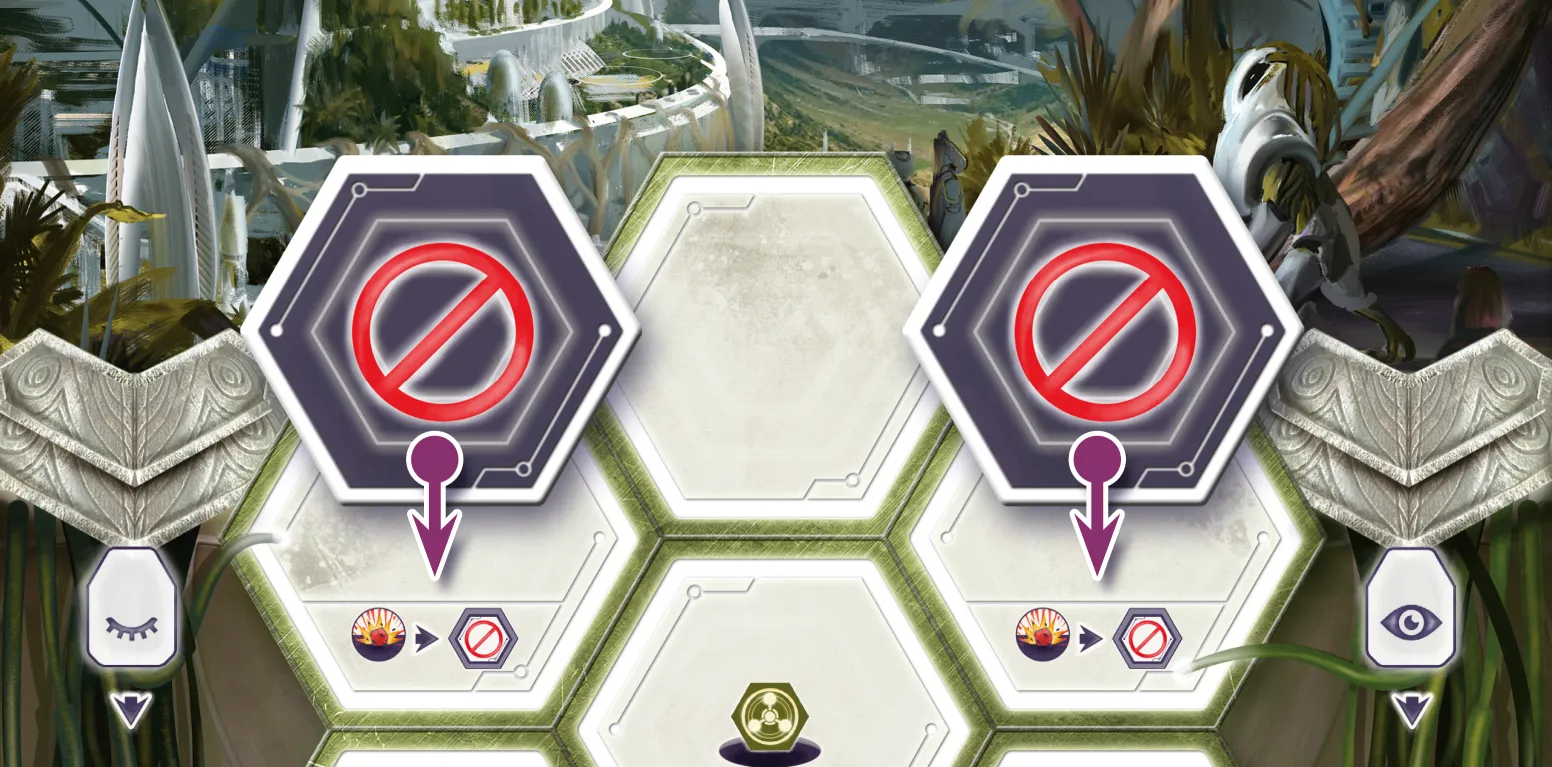
Cover two of the three Exosuit Hex spaces in the top row
on each Player board with a Hex Unavailable tile. Players may no longer
power up Exosuits on these Tiles, nor do they receive any Water income for them.
NEUTRONIUM
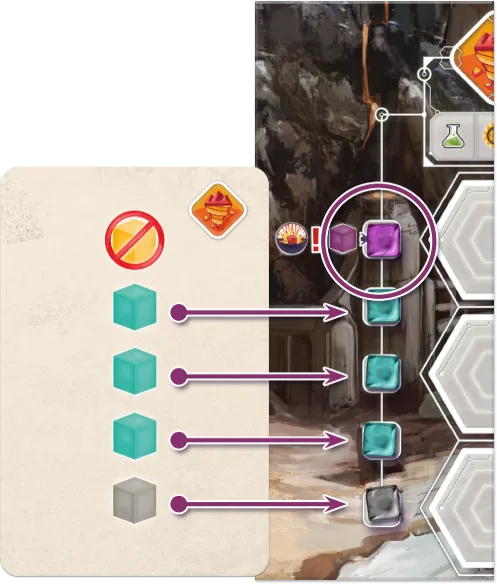
After the Impact, the topmost Resource on the drawn Mine pool card is ignored. Put a Neutronium in the topmost slot instead.
The Impact further increases the amount of Neutronium on Earth. In post-Impact Eras, ignore the topmost
Resource of the drawn Mine pool card, and place a Neutronium on the topmost slot instead.
ENDING THE GAME
The game ends at the end of the Era when the last Capital Action space becomes unavailable or if the final Era (7th) is finished.
UNTANGLE THE CONTINUUM
Each player must now fulfill all their remaining Warp tiles on the Timeline by paying the appropriate resources.
Any Warp tiles that cannot be fulfilled remain on the Timeline and score -2 VPs.
At this point, players must straighten out the problems they have with the Timeline. They must fulfill every
outstanding Warp tile to remove them from the Timeline. Workers must still be returned from the Active column
and an Exosuit must be powered-up to be returned this way. These removals do not count as Time Travel: players
don’t use Power Plants for them, and they score no points and do not advance the Time Travel marker.
For each Warp tile players are unable to remove from the Timeline, they score -2 Victory Points.
SCORE ENDGAME CONDITIONS
For each endgame condition where you have the most among all players (or tied for the most), score 3 VPs.
Look at the five Endgame Condition cards above the Main board. Each player scores 3 VP for each of these
conditions they meet. In case of a tie, all players involved in the tie score the full amount.
FINAL SCORING
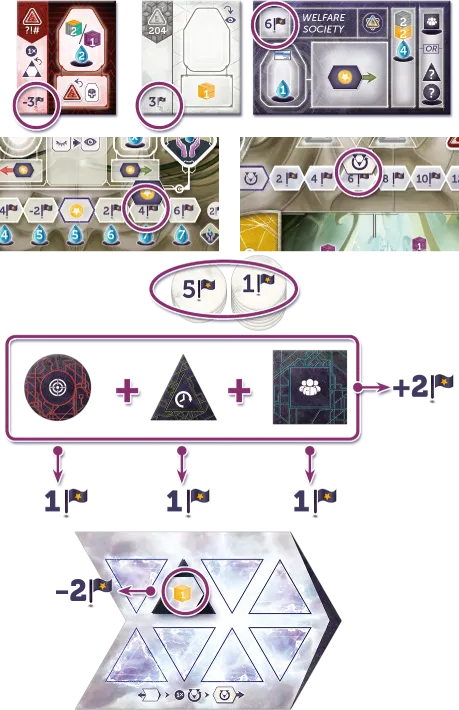
Each player scores points from:
- their buildings, Anomalies, and Superprojects,
- the current step on their Morale and Time Travel tracks,
- Victory Point tokens,
- unfulfilled Warp tiles (-2 VP each),
- Endgame Conditions met (+3 VP each),
- Breakthroughs (+1 VP each and +2 VP per set of 3 different shapes).
The player with the most points is the winner. Ties are broken by most Water and then most total Resources.
Tally up points from buildings, Anomalies, Superprojects, Time Travel, Morale, Victory Point tokens, Timeline
penalties and Endgame Conditions using the scoring pad provided. Each individual Breakthrough is worth 1 VP.
In addition, a set of three Breakthroughs with different shapes (i.e. Circle, Triangle, Square; the icons do NOT
have to match) is worth an additional 2 VP/set.
The Path Capital with the most Victory Points becomes the new seat of the World Council and thus wins the game.
In case of a tie, most Water, then most total Resources decide the winner. If still undecided, players share victory
– the Council will rotate between them.
OPTIONAL RULES
GAMEPLAY VARIANT — ALTERNATE TIMELINE
When setting up the Timeline, choose Timeline tiles at random and set them to the alternate side which has
bonuses and penalties associated with some of the slots.
In the Warp Phase, after revealing tiles, each player in turn order places their chosen Warp tiles
in the next available empty slots as depicted. If placing two tiles, the player gets to choose the order.
The player immediately receives the bonus or penalty when placing into a slot that has one. The possible rewards are:
- +1 Morale
- +1 VP
- An additional one of the asset on the Warp tile (Workers will cost an additional Water)
- -1 Paradox
- -1 Morale
- +1 Paradox
With the Alternate Timeline gameplay variant, players can add another strategic twist to the Warp phase.
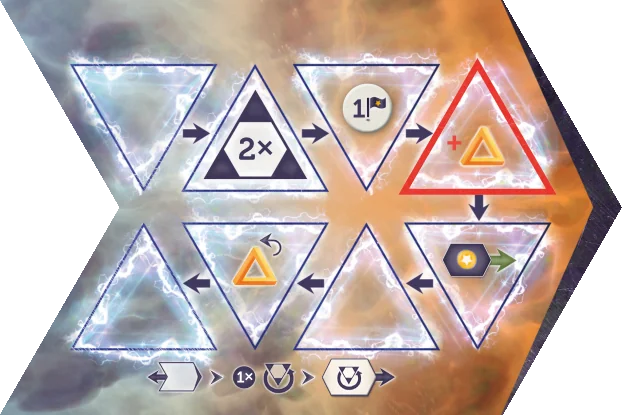
After setting up the Timeline, turn each Timeline tile to its alternate (crimson-colored) side. Certain Warp slots on
this side have bonuses or penalties associated with them.
When playing with the Alternate Timeline, players have to follow the standard player order (clockwise, starting
from the First Player) when revealing and placing their hidden Warp tiles. When it’s a player‘s turn to reveal and
place their Warp tiles, they must place them on the first available empty slot(s) in the order pointed out by the arrows.
If they choose to place two Warp tiles at once, they may choose the order in which they place them. If
a Warp tile is placed on a slot with a bonus or penalty symbol,
the player immediately receives that bonus or penalty.
The following bonuses can appear on the Alternate Timeline tiles:
Inspiring Message: Gain 1 Morale
Glorious Future: Gain 1 Victory Point
Parallel Timeline: Receive an additional one of the asset on the Warp tile placed here.
Stable Time Rift: Remove 1 Paradox
The following penalties can appear on the Alternate Timeline tiles:
Grim Message: Lose 1 Morale
Collapsing Time Rift: Gain 1 Paradox
NOTE: When returning a Warp tile on a Parallel Timeline slot via Time Travel later, the player still only
has to pay one of the respective asset (even though he received two when he placed the Warp tile).
GAMEPLAY VARIANT — STARTING ASSET DRAFT
Instead of Path-specific Starting Assets, give each player 2 Scientists and 1 Engineer (all Active), 2 Energy Cores, 2 Water,
and 8/5/4 Starting Asset cards (for 2/3/4 players).
Each player chooses one Starting Asset card, then passes the remaining cards to the player on their right.
Repeat this process until each player has chosen four cards.
All players receive the Assets they've drafted this way. The player with the lowest sum of numbers on their cards
will be the First Player; ties are broken by the lowest-numbered card.
By using the Starting Asset Draft, players can add more variety to the starting assets of their Path each game.
During the Setup, instead of giving each player the Starting Assets depicted on their Path board, give each player:
- 2 Scientists (Active)
- 1 Engineer (Active)
- 2 Energy Cores
- 2 Water
Then, deal the following number of Starting Asset cards to each player:
- 8 in a 2-player game
- 5 in a 3-player game
- 4 in a 4-player game
After this, each player chooses one card in their hand, places it face down in front of them, and passes the
remaining cards to the player to their right. Repeat this process until each player has chosen four cards. Return
the remaining cards to the box (8 in a 2-player game and 3 in a 3-player game). All players receive the assets
printed on their four chosen cards.
Finally, each player adds up the numbers on the bottom of their selected cards.
The player with the lowest sum will be the First Player in the first Era.
If there is a tie, the player with the lowest-numbered card will be the First Player.
GAMEPLAY VARIANT — ENDGAME CONDITION DRAFT
Instead of selecting Endgame Condition cards randomly, deal 2 Endgame Condition cards (4 for 2-player) to each player,
then each player simultaneously picks 1 of them (2 in 2-player).
Randomly pick additional Endgame Conditions from the undealt/unchosen cards until there are 5.
With the Endgame Condition Draft, players have more control over what will be worth additional Victory Points
at the end of the game.
Instead of selecting 5 Endgame Condition cards randomly:
-
Deal 4 to each player in a 2-player game, then each player simultaneously picks two of the four,
and reveals them.
-
Deal 2 to each player in a 3 and 4-player game, then each player simultaneously picks one of the
two, and reveals it.
Finally,
from the undealt cards, choose one (two in a 3-player game), and add it to the previously picked
cards. Players will now have 5 Endgame Condition cards to play with.