
Players take turns moving their mules clockwise along the track and performing actions of the track spaces.
The player whose mule is furthest behind on the track takes a turn.
Thus, the same player may take multiple turns in a row.
When all mules have reached the "end" space, the game ends and the player with the most dirhems wins.
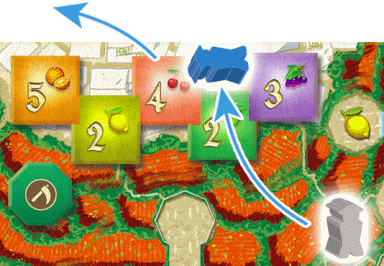
Example: Blue is furthest back, so Blue takes the first turn.
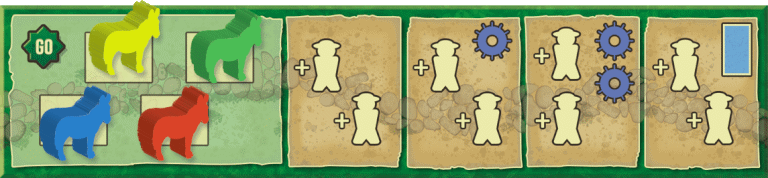
The player whose mule is furthest back (i.e., closest to the "go" space) takes a turn.
Taking a Turn
Your turn consists of 2 steps:
Step 1: Move Your Mule
Step 2: Perform Actions
Step 1: Move Your Mule
Move your mule forward along the track to any space.
You may not stop in a space that contains another mule, except for market and harvest spaces,
which are subdivided into multiple spots that hold 1 mule each.
If you start your turn in a market or harvest space,
you may not move into another spot in the same space.
Strategic Note: You may go as far as you wish, but it is usually in your best interest to stop
in every market and harvest space.
Step 2: Perform Actions
Perform the actions of the space where you stop.
The track spaces are of three types: standard, market, and harvest.
You may perform extra actions by spending norias.
See the "Spending Norias" section.
These spaces are all the spaces without either of the market  or harvest
  icons.
Perform the action(s) of the space where you stop (in any order).
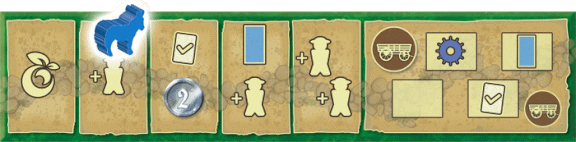
The actions include: add a farmer, move a farmer, irrigate, take a noria, take fruit,
take dirhems, and complete a goal.
icons.
Perform the action(s) of the space where you stop (in any order).
The actions include: add a farmer, move a farmer, irrigate, take a noria, take fruit,
take dirhems, and complete a goal.
Add a Farmer
Move a Farmer
Irrigate

Take a Noria
Take Fruit

Take Dirhems

Complete a Goal
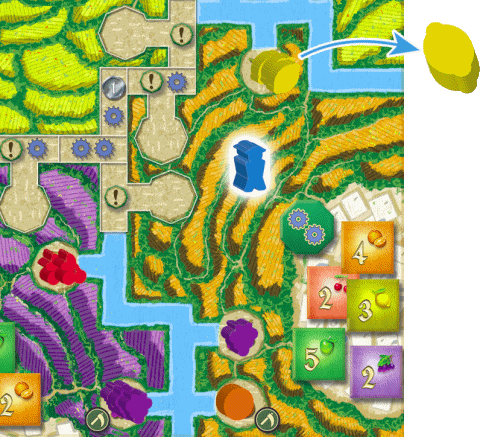
Example: You land on an "add a farmer" space.
You put a farmer in the orange farmland, which has lemons, oranges, and grapes.
You already have 5 grapes, so you must take either an orange or a lemon.
You decide to take a lemon.
Add 1 farmer from your supply into any farmland unless the action space has a specific color indicating a specific farmland.
When adding a farmer take any 1 fruit from any fruit field in that farmland.
You may not take a fruit if you already have 5 of that type.
The fruit on the board is limited, so if you add a farmer in a farmland without fruit, you gain no fruit.
If you do not have any farmers remaining in your supply, this action becomes "move a farmer".
See the "move a farmer" section.
 Important:
 If you stop on an action space allowing you to add 2 farmers,
you must place them in 2 different farmlands.
 Important:
 "add a farmer" spaces with a different colored background (showing a shield)
indicate the specific farmland the farmer must be placed in.
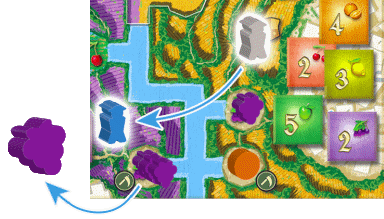 Example:
 You move a farmer and take 1 grape.
Move 1 of your farmers from a farmland (not village) to any other farmland (not village).
When you move a farmer, take 1 fruit from a fruit field in the farmland you moved to.
Remember: You may have only 5 of a fruit type.
Take a channel token from the supply and expand any of the water channels.
The tile must be placed in a space adjacent to another channel tile or to a starting water channel printed on the board.
The channel tokens are either t-shaped or straight to match the different spaces on the board.
Choose the shape that matches the shape on the board.
New Crop Bonus
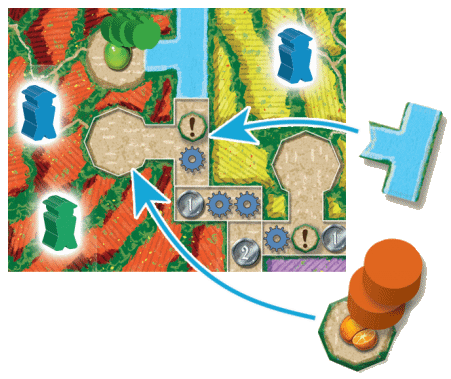
Example:
You place an irrigation channel in this space.
You choose to place an orange crop token, so you take an orange from the supply for yourself.
Then you take two oranges and place them on the token.
You also earn a noria (for the noria icon in the space).
After placing a t-shaped channel token, take an available crop token (your choice)
from the supply and place it in the field where the channel token leads.
Next, take 1 fruit of that type from the supply for yourself
and then take 2 of that fruit from the supply and place them on the crop
token.
If there is not enough fruit of the type in the supply, perform the action to the
fullest extent possible (giving yourself 1 fruit before placing any on the token).
Important: If you already have 5 fruit of a given type and choose a crop token
of that type, take a noria instead of that fruit.
When placing a straight channel token you will not receive a new crop bonus, as none
of those spaces lead to a new fruit field.
Additional Actions
Some of the water channel spaces includ a "take a dirhem" icon and/or a "noria" icon.
When placing a token over these icons, you may take these actions as described below.
When your mule stops in a space with a noria icon, take 1 noria for each icon shown.
You may have at most 5 norias. The large noria is worth 3 norias.
You may immediately spend 1 or more norias to stay below the maximum when taking more norias.
See the "Spending Norias" section below.
When your mule stops in a space with a fruit icon, take any 1 fruit from the supply for each icon shown.
Remember: you may have only 5 of a fruit type.
Important: Take fruit from the supply and not from the board when performing this action.
When your mule stops in a space with a dirhem icon, take as many dirhems as shown.
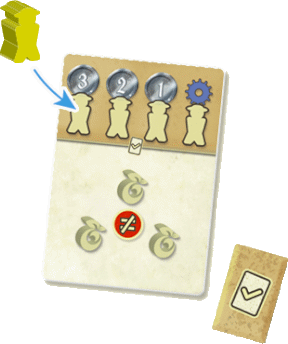
When your mule stops in a space with a check mark icon, you may complete exactly 1 goal if you meet a goal card's requirements
(see the Appendix).
To complete a goal, place a farmer from your supply onto 1 of the card's unoccupied farmer spaces and take the reward shown.
The same player may not complete the same goal more than once.
If you have no farmers in your supply, move a farmer from any farmland (your choice) to the card.
If you are unable to complete any goal card's requirement, take a goal token instead.
In the future, when you land on a "complete a goal" space, you may spend a goal token to complete an additional goal, assuming you meet its requirements.
You may use multiple tokens.
Market spaces are marked with a cart icon .
Each market space is subdivided into multiple spots that can hold 1 mule each.
Most spots also have a standard action icon.
When you stop in a market space, place your mule in any of the spots and perform the standard action (if any)
plus the market action (see below) in either order.
After all players have entered or passed a market space, the player whose mule is furthest behind takes the next turn.
If you begin your turn in a market space, you must leave the market space after that turn.
Market Space Action: Deliver Fruits
When your mule stops in a market space, you may deliver fruits to earn a delivery token and/or a delivery card
(in addition to other actions of the space).
You may earn only one of each per stop in a market space.
Important: You may earn only 1 delivery token and/or 1 delivery card per stop in a delivery space.
Note also that there are only 5 opportunities in the game to deliver fruits.
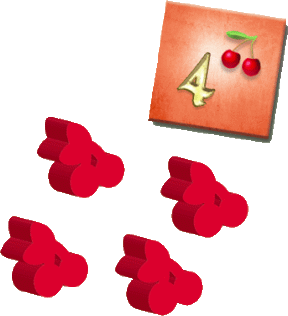 Example:
 You move a farmer from the red farmland to the accompanying village to sell 4 cherries.
You return 4 cherries to the supply and take the matching delivery token.
Earn a Delivery Token
When in a market space, you may deliver 1 type of fruit to 1 village to earn 1 delivery token.
To do so, move one of your farmers from the farmland to its village and
return to the supply the type and number of fruit matching a delivery token in the village.
After returning the fruit, take the delivery token and place it face-up in front of yourself.
You may not deliver to a village unless you have a farmer in the accompanying farmland.
Once a farmer is moved to a village, the farmer is no longer in the farmland.
Lay farmers in villages down to show clearly that they are no longer in farmlands.
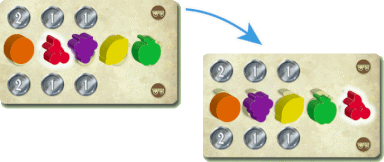
Example: You delivered cherries, so you earn 1 bonus dirhem
You then move the cherry to the far right and slide the grape, lemon and apple to the left.
Market Bonus
After earning a delivery token, check the fruit on the market card.
If the fruit type you delivered is in 1 of the first 3 spaces on the market card, you earn either 1 or 2 dirhems from the supply, as shown on the card.
The fruit types in the last 2 spaces do not earn a bonus.
Next, regardless of any bonus earned, move the fruit type you delivered to the far right and slide the others left to fill in the spaces.
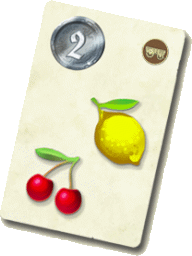 Example:
 You return a lemon and a cherry to take this card worth 2 dirhems.
Earn a Delivery Card
When in a market space, you may earn 1 delivery card by returning to the supply the exact fruit shown on a face-up delivery card.
Return the fruit to the supply and take the card (to score at game end).
Flip a new card to take the other card's place (unless the deck has run out).
The market bonus does not apply to delivery cards.
On Yucata delivery cards are scored when earned rather than at game end.
Important: The market bonus applies only to earning delivery tokens, not cards.
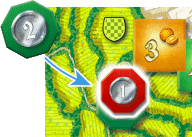
Example: You are first to deliver fruit to the yellow village.
The award token shows 2 dirhems, so you take 2 dirhems, then flip the token.
The next player to deliver to this village will earn 1 dirhem.
The token would then be discarded.
Award Tokens
The first player to deliver fruit to a village earns the action(s) on the green side of that village's award token.
After taking the action(s), flip the token to its red side.
The next player to deliver fruit to that village (possibly the same player) earns the award on the red side,
then removes the token from the game.
The award token icons include the actions previously described.
Harvest spaces are marked with a sickle icon .
Like market spaces they are subdivided into multiple spots.
Movement in and out of harvest spaces follows the same rules as for market spaces.
When your mule stops in a harvest space, you may perform the harvest action in addition to any actions listed in the spot.
Harvest Action
Example: You are the blue player.
You have the most farmers in the purple and orange farmlands.
You take a grape (the primary fruit of the purple farmland) and have earned an orange (the primary fruit of the orange farmland).
However, you already have 5 oranges, so you take a noria instead of an orange.
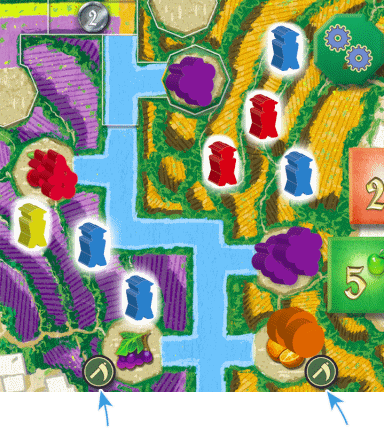
Grapes are the primary fruit in the purple farmland.
Oranges are the primary fruit in the orange farmland.
To harvest, take 1 primary fruit from the supply for each farmland in which you have the most farmers.
The primary fruit of a farmland is indicated by the sickle icon next to the fruit field.
Note that each farmland is colored to match its primary fruit. For 3-4 players, ties count in your favor.
For 2 players, you must have more farmers in the farmland than your opponent.
Farmers in villages do not count when determining who has the most.
If you already have 5 of a fruit and earn another, you take a noria instead.
If there is none of the primary fruit in the supply, take a noria instead.
Important: Take fruit for harvesting from the supply, not from the board.
Important: If you already have 5 fruit of a given type and earn one by the harvest action, take a noria instead.
Anytime during your turn you may spend norias by returning them to the supply to perform an action(s).
You may spend norias before receiving some in order to stay at or below the maximum.
If you add or move a farmer, you also earn a fruit as usual.
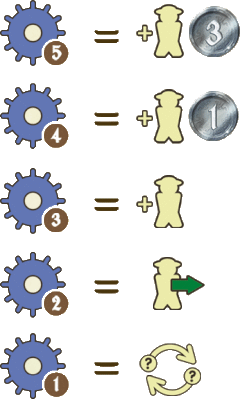 |
Spend 5 norias to add a farmer and earn 3 dirhems.
|
|
Spend 4 norias to add a farmer and earn 1 dirhem.
|
|
Spend 3 norias to add a farmer.
|
|
Spend 2 norias to move a farmer.
|
|
Spend 1 noria to return 1 fruit and take 1 fruit from the supply.
|
Players take turns until all mules enter a spot in the end space,
which is marked with the end icon.  You may move your mule to any spot in the end space, but may not move it again.
After entering the end space you may perform 4 actions, if possible.
You may move your mule to any spot in the end space, but may not move it again.
After entering the end space you may perform 4 actions, if possible.
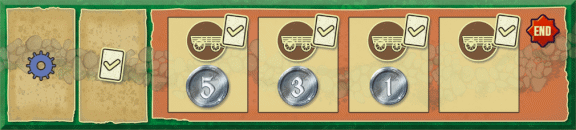
end spots for a 4-player game in the red area
-
Market Action
-
Complete a Goal
-
Collect Dirhems
-
Sell remaining fruit/norias
A Market Action,
B Complete a Goal, and
C Collect Dirhems
The end spots include these three action icons.
You may perfornm all three, as previously described.
However, if you have already completed all 4 goals, you do not take a goal token.
D Sell remaining fruit/norias
Return your remaining fruits, norias, and goal tokens to the supply and collect 1 dirhem for every 3 items returned (rounded down).
Total the different items together before returning them.
Determining a Winner
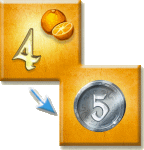
Players flip their delivery tokens to show the side with dirhems (which is always 1 more than the fruit number).
Players then sum these dirhems with those earned and with those on their delivery cards.
The player with the most dirhems wins.
For ties, the player whose mule is in the more valuable end space spot wins the tie.
On Yucata players are awarded dirhems for their delivery tokens and delivery cards when they are earned rather than at game end.
Play the game as described, except with the changes noted below.
Follow the 2-player extra steps described in the Setup section.
In a 2-player game a mule of an imaginary third player (named "Zara") moves on the action track.
When Zara's mule is furthest back, roll the die and move her mule the number of spaces shown, not counting spaces containing other mules.
It must stop in every market and harvest space.
Each spot within a market or harvest space should be counted when entering the space.
If the die roll would move it further, the mule moves as far as possible within the space.
Zara acts only when her mule arrives in a market or harvest space.
On her next turn her first step is to the first available space outside the market or harvest space.
Market Spaces
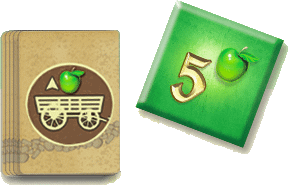
Example: Zara's mule is in a market space.
The top card in the delivery card deck shows an apple and an up-arrow.
You remove the highest valued delivery token with an apple from the board.
You then adjust the market card by moving the apple to the far right and sliding the other fruit to the left.
When Zara's mule stops in a market space she discards a delivery token from the board by this method:
Check the icon on the top card of the delivery card deck. If the arrow points up, remove the highest valued delivery token from the board of the fruit shown on the card's back.
If the arrow points down, remove the lowest valued delivery token of that type.
If no delivery tokens remain of the designated type, remove nothing.
After removing a token, adjust the fruit on the market card as if a real player delivered the fruit type shown.
Harvest Spaces
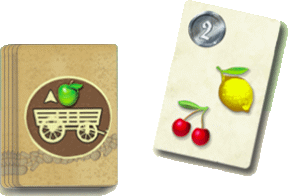
Example: You flip this card showing a lemon and a cherry.
The top card now shows an apple (the primary fruit of the green farmland).
So, you remove a lemon and a cherry from the green farmland.
When Zara's mule stops in a harvest space remove fruit from the board (and return it to the supply) using this method:
Flip the top card of the delivery card deck and then remove the fruit shown from the region whose primary fruit matches the new top card of the deck.
If there is no fruit of a type to be removed, simply ignore it.
Move the flipped card to the bottom of the deck face-down.
End Space
When Zara's mule reaches the end space, she immediately stops in the first available spot,
i.e. she will take the spot worth the most dirhems.
2-Player Reminder: When counting farmers during a harvest, ties do not count in your favor.
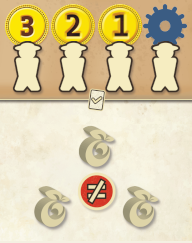
3 Different Fruit:
Possess at least 3 different fruits.
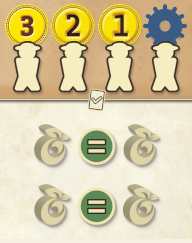
2 Pairs of Fruit:
Possess at least 2 pairs of 2 different fruits.
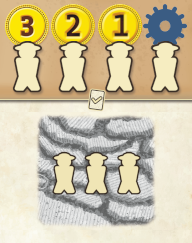
3 Farmers in 1 Farmland:
Have at least 3 of your farmers in 1 farmland.
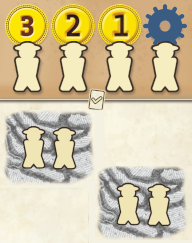
2 Farmers in 2 Farmlands:
Have at least 2 of your farmers in 2 different farmlands.
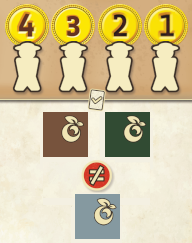
3 Different Delivery Tokens:
Possess at least 3 delivery tokens of different fruit types.
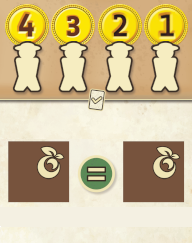
2 of the Same Delivery Tokens:
Possess at least 2 delivery tokens of the same fruit type.
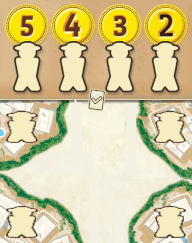
1 Farmer in 4 Different Villages:
Have at least 1 of your farmers in 4 different villages.
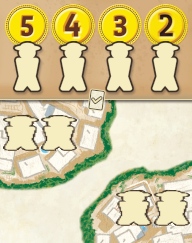
2 Farmers in 2 Different Villages:
Have at least 2 of your farmers in 2 different villages.
Per the designer, actions are atomic. An action may not be interrupted to spend norias
unless the player earns norias during the action that would bring his total to more than five.
In that case the player may immediately spend norias from his supply to avoid forfeiting all
or some of the earned norias.
Per the designer, the three possible steps in a market action (deliver fruits, perform an award token action,
and earn a delivery card) are considered to be part of a single atomic action.
Per the designer, completing a first goal and completing a subsequent goal via a goal token
are considered to be separate actions.
A player gets a goal token if he is unable to complete a goal but does not get a goal
token if he can complete a goal but chooses not to.
Hovering over a number in the game log of a track space number or channel causes a
white star to appear over the track space or channel.
Buying a delivery card cannot be undone unless the player is buying the
last (twentieth) delivery card, which can happen only if all four players buy a delivery
card during each of their five market actions.
The types and numbers of delivery tokens a player has bought are displayed only for the purpose
of determining whether the player can complete the third goal
("bought three types of delivery tokens" or "bought two of the same type of delivery token").
They are no longer displayed after the player has completed that goal.