The English translation is based on the work of Steve McKeogh. His original translation is available at BoardGameGeek.
Aim
The players try to create as many islands as they can and connect them to each other with bridges.
Preparation
The start player takes two of the light tiles and puts them on any space of the board. The other player now chooses whether to play with the light or the dark tiles.
Start
The player using the dark tiles now places two of them.
Rules for playing
Rule 1: Placing
On your turn, you place either
- two tiles of your colour on any free spaces of the board (the two tiles do not need to be next to each other) or
- one bridge on two of your tiles.
Rule 2: Islands and sandbanks
An island is a formation of 4 tiles of the same colour, touching side-to-side (not just diagonally).
An island always consists of exactly 4 tiles,
never any more nor any less. They can be of any shape possible.
A sandbank is a group of 1, 2
or 3 tiles of the same colour.
An island cannot touch another island of the same colour or sandbank of the same colour. It cannot even touch diagonally (Distance rule, see example 1).
Sandbanks can touch each other diagonally (examples 1 and 4).
They can only be extended to form an island if they then do not touch any other island or sandbank, of the same colour, and do not consist of more than 4 tiles (examples 2, 3 and 5). The distance rule does not apply to islands or sandbanks of different colours! (example 6).
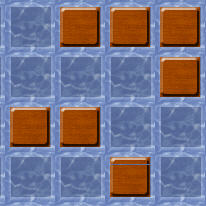 Example 1:
The distance rule is maintained.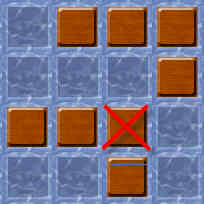 Example 2:
A tile cannot be placed on this space to form an island from the 2 sandbanks, as the distance rule would be broken.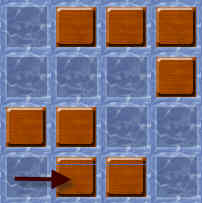 Example 3:
An island can be formed here.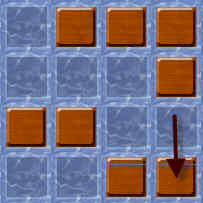 Example 4:
The player extends a sandbank.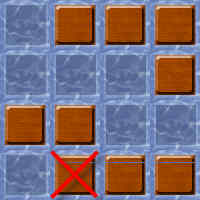 Example 5:
A tile cannot be placed here, as you cannot have a formation of 5 tiles of the same colour.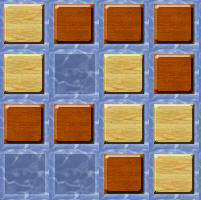 Example 6:
Tiles of different colours may touch each other without restrictions.Rule 3: Bridges and blocked spaces
A bridge connects 2 tiles of the same colour which have one space separating them (example 7). A tile can only support one bridge (example 8). A bridge cannot be built over tiles of either colour (example 8). Tiles cannot be placed under a bridge and so there will be 1 or 2 blocked spaces underneath (example 9).
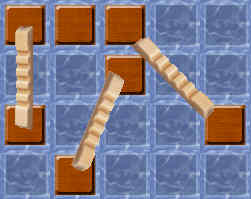 Example 7:
Bridges can be built in these 3 different ways.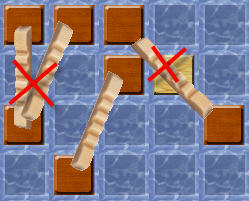 Example 8:
The bridges to the left can’t be built like this as a tile can only support 1 bridge. The bridge to the right can’t be built as there is a tile under it.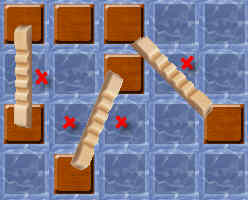 Example 9:
The highlighted spaces are blocked.Bridges may not cross or overlap. A bridge connects different islands or sandbanks; it cannot connect two tiles of the same contiguous formation. Parallel bridges may share blocked water spaces if the bridges do not intersect.
End
If the light player can no longer place two tiles and does not want to build a bridge, the dark player has one more turn. If the dark player can no longer place two tiles and does not want to build a bridge, the game ends immediately.
Scoring and winner
Each player scores his islands. A single island, which is not connected to other islands, is worth 1 point. Connected islands (including via sandbanks) count as follows:
Number of
Connected Islands | Points |
|---|
| 2 | 3 |
| 3 | 6 |
| 4 | 10 |
| 5 | 15 |
| 6 | 21 |
| 7 | 28 |
| 8 | 36 |
The winner is the player with the most points. If there is a tie, the winner is the player with the most islands. If there is still a tie, the winner is the player with the most bridges. If there is still a tie, both players have won.
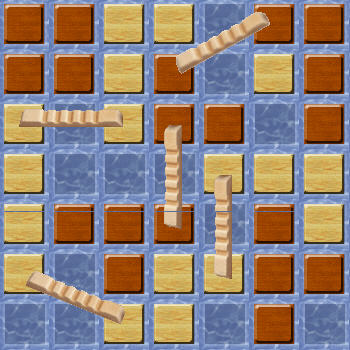 Example of scoring on a reduced board:
Light has 4 connected islands: 10 points. Dark has 2 connected islands (via a sandbank): 3 points. He also has 2 single islands: 2 points. Dark has a total of 5 points.Playing on Yucata
Select a highlighted empty space to place each tile. Select one of your highlighted tiles and then the other endpoint to build a bridge. Select the first endpoint again or press Escape to cancel that selection. Each tile and bridge can be undone before confirming with the standard Finish turn button. When no pair of tiles is possible, Finish turn declines building a bridge. Light and dark name the two rule roles; the displayed tile colors follow your player color preferences. The last opposing tiles have white outlines; the last opposing bridge is dashed.